

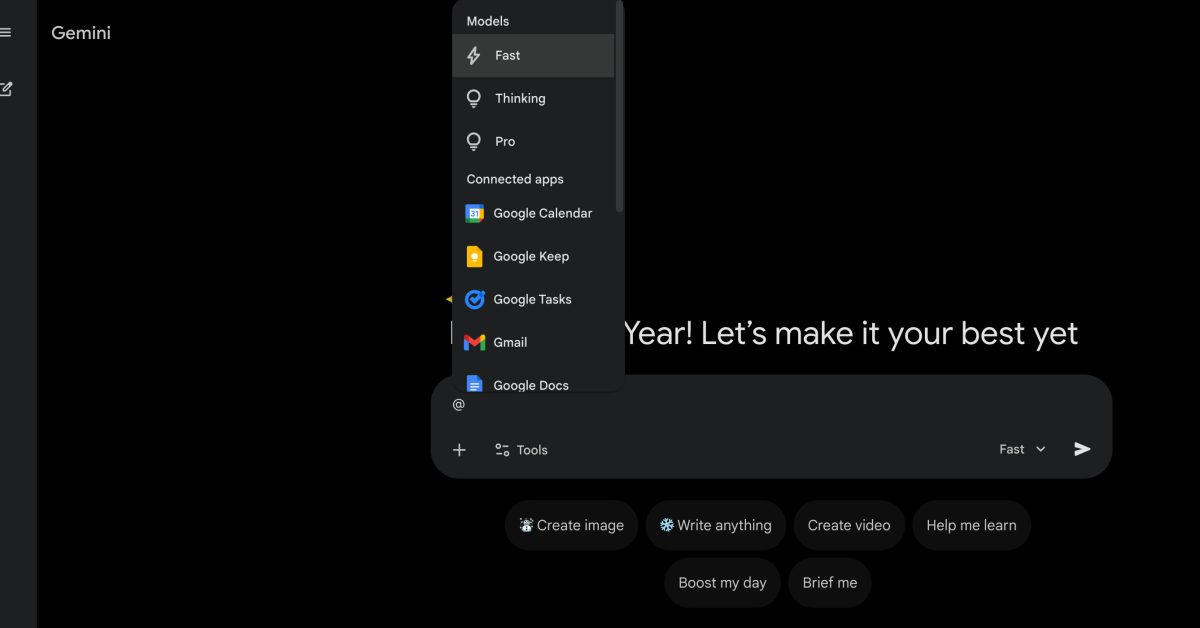
With the launch of Gemini 3 Flash, the Gemini app’s model switcher expanded, and there’s now a faster way to make a selection.
Previously, the @-menu on gemini.google.com just showed extensions. We’re now seeing a “Models” section appear at the top that saves you from having to use the dropdown in the bottom-right corner of the prompt box, which updates to reflect your choice.
You can use your arrow keys to make a selection, or type the first letter and then enter. Afterwards, @Fast, @Thinking, or @Pro will appear in the field, with users able to bring up the menu again to choose one of the “Connected apps.”
We’ve just noticed this in recent days on the web (not available on mobile), but it might have launched earlier. It’s a good quality-of-life improvement when you have a burning prompt.
More on Gemini:
Gemini will replace Google Assistant on Android in 2026
Gemini app now lets you edit with Nano Banana by drawing, detect AI videos
Gemini app adds NotebookLM integration
FTC: We use income earning auto affiliate links. More.