



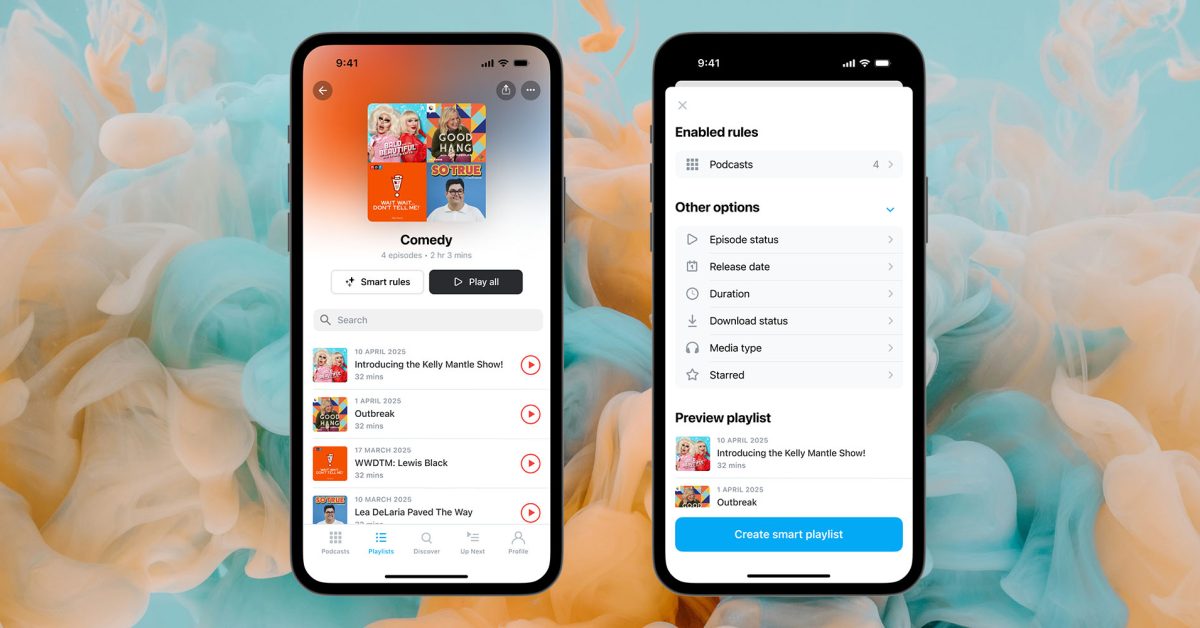
Both mobile and desktop versions of the Pocket Casts app have introduced a new playlist feature designed to help you organize your favorite podcasts.
You can manually create your own playlists by hand, while a Smart Playlists option can apply your own rules to do the job automatically …
The new feature is available in version 8 of the iPhone app and version 6 of the Mac app.
Create and customize playlists by hand. Use your own order, save episodes for later, or build collections around trips, themes, or guests you love.
Smart Playlists automatically gather episodes from the podcasts you follow based on the rules you set. For example, you can make a “Quick Listen” Smart Playlist that gathers episodes from your favorite shows that are less than 25 minutes long.
Playlists don’t have to be limited to the podcasts you follow. When creating a manual playlist, you can include individual episodes of additional shows.
From the main screen, open the Playlists tab.
Tap “+” on mobile or click “New playlist” on the web.
Give it a name and tap “Create playlist.”
Once you’ve created and named your playlist, you’ll see a tappable option beneath the name ‘Make into Smart Playlist.’ This will then present you with options for creating the rules you want to be applied to it.
You can find full details here.
Highlighted accessories
Official Apple Store on Amazon
Apple 40W Dynamic Power Adapter for iPhone 17
Official Apple iPhone Air cases and bumpers
iPhone Air MagSafe Battery
Official iPhone Air case
Official iPhone 17 cases
Official iPhone 17 Pro cases and Pro Max cases
Image: 9to5Mac/Pawel Czerwinski on Unsplash/Pocket Casts
Add 9to5Mac to your Google News feed.
FTC: We use income earning auto affiliate links. More.